Professional Portfolio or Photobook: A Modern Template for Designers
You know that moment when you’re staring at a blank page, trying to organize your best work into something that looks effortless? A strong Professional Portfolio or Photobook template removes that friction. It’s not just a collection of pages; it’s a structural framework designed to let your visuals breathe while guiding the viewer’s eye exactly where it needs to go. If you’re a photographer, designer, or visual artist, this kind of organized asset is the difference between looking amateur and looking established. We aren't just talking about pretty pictures; we are talking about a layout strategy that respects your content.
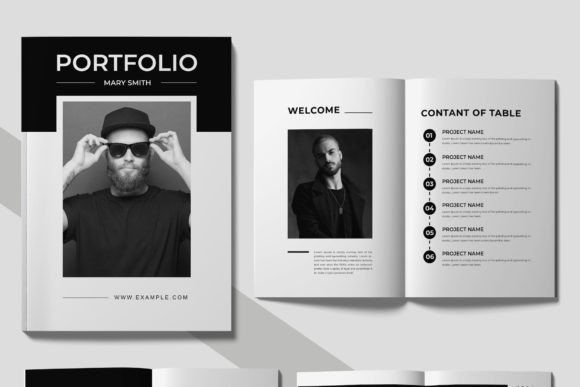
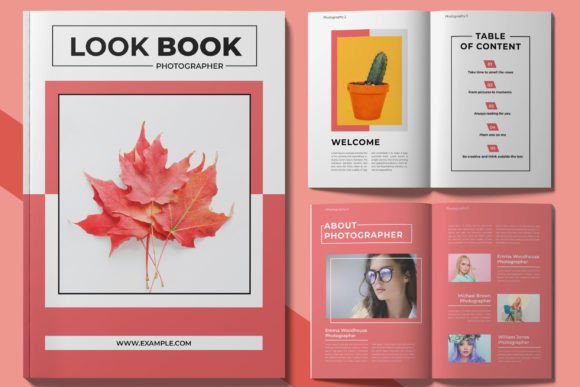
Based on a contemporary A4 paper size and utilizing a CMYK color scheme, this template is built specifically for the physical world. It bridges the gap between digital creation and tactile reality. The visual personality here is clean and professional—think sharp lines, ample white space, and a modular grid that adapts to both portrait and landscape imagery. It feels modern without being cold, offering a premium font aesthetic that supports your work rather than competing with it. Whether you are using InDesign or looking for an easy edit template workflow, the structure is layered and well-organized, meaning you can swap out images and text without breaking the layout.
Visual Identity: The Power of a Clean Grid
The appeal of a well-executed Professional Portfolio or Photobook lies in its restraint. In a world of cluttered web design and noisy social media graphics, a print layout with intentional white space feels like a deep breath. The design here leans into modern typography principles. It uses hierarchy to create a narrative flow. Your cover sets the tone, your table of contents establishes credibility, and the interior spreads provide the stage.
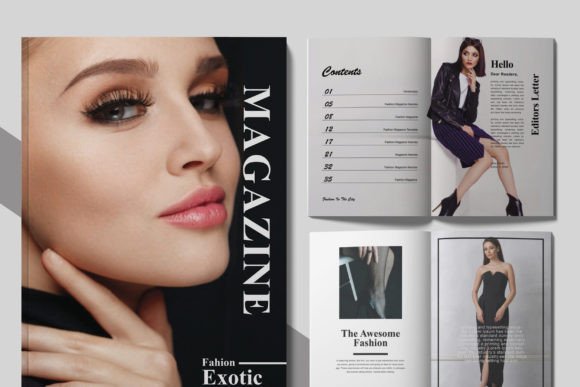
Because the template utilizes print ready files, you don’t have to worry about bleed margins or resolution issues. It’s set up for production. However, the true value is in the visual hierarchy. A strong portfolio uses negative space to frame your "hero" images. It creates a rhythm—perhaps a full-bleed spread followed by a grid of four smaller images. This variation keeps the reader engaged. It’s an editorial design approach applied to personal branding. You are the publisher here, and this template is your production house.
Strategic Applications for Creatives and Entrepreneurs
Who actually needs this? The short answer is anyone who needs to prove their value visually. But let’s break that down into real-world scenarios where this design asset pays for itself immediately.
- The Graphic Designer: You need to show clients that you understand layout, color theory, and brand identity. Handing over a chaotic PDF won't cut it. A Professional Portfolio or Photobook demonstrates that you value presentation as much as the work itself.
- The Wedding Photographer: This is where the "Photobook" aspect shines. Clients want to see how you tell a story. A template allows you to sequence images to build emotion, moving from the details to the ceremony to the reception.
- The Interior Designer or Architect: You need space for floor plans, mood boards, and finished photography. The A4 paper size is versatile enough to handle technical drawings without losing the emotional impact of the final photos.
- Small Business Owners & Product Designers: If you are pitching to buyers or investors, a physical lookbook adds weight to your proposal. It shows you are serious about packaging design and product presentation.
Even if you are primarily a digital creator, having a physical asset creates a tangible connection. Sending a potential high-ticket client a beautifully printed book leaves a digital email attachment in the dust. It’s a commercial font and layout solution that elevates your perceived value instantly.
Practical Workflow: Editing and Customization
One of the biggest hurdles with design templates is the "locked" feeling—where you want to move one text box and the whole document falls apart. This Professional Portfolio or Photobook is built on a well-organized layer system. For the uninitiated, this means the file is structured like a set of transparent sheets stacked on top of each other. Images are on one layer, text on another, and background elements on a third.
Here is how to approach the customization process to ensure the final product looks like it was made from scratch:
- Assess Your Content First: Before opening the file, lay out your images. Do you have mostly vertical or horizontal shots? This dictates which layout variations inside the template you will use most.
- Font Strategy: The template comes with links to free fonts. This is crucial for keeping costs down while maintaining a high-end look. However, if you have a specific sans serif font or serif font that defines your brand, swap it in. Ensure your font pairing maintains readability—one decorative font for headers and a clean sans-serif for body text is a classic rule that works.
- Color Palette: While the file is set to CMYK for printing, you can easily adjust the accent colors to match your brand hex codes. Just be mindful of how colors shift from screen to print.
The goal is consistency. When you flip through the pages, the style should feel cohesive. If you are using this for a logo design presentation, ensure your mockups are high-quality. The template provides the structure, but the content provides the conviction.
Final Thoughts on Presentation
In the creative industry, your presentation is part of your product. A sloppy proposal suggests sloppy work. A polished, instant download template like this Professional Portfolio or Photobook allows you to bypass the layout struggles and focus on the storytelling. It’s a tool for designers, marketers, and hobbyists who want to present their work with the professionalism it deserves. Whether you are printing it for a client meeting or sending it as a high-res PDF, the result is a cohesive, modern, and persuasive piece of visual communication.